
If you run a small business in regional Australia and you have noticed a GA4 traffic spike from China (Lanzhou) and Singapore, do not pop the champagne yet. For many businesses, this recent jump in numbers is not real customers. It is inauthentic bot traffic that is slipping into GA4 and making your reports look better than they are.
This matters because small businesses do not have time or money to chase the wrong story. If the data is off, the decisions are off. And that is how budgets get wasted.
What is actually happening in GA4 right now
Across the web, site owners have reported a sudden surge of Direct traffic in GA4, often originating from locations such as Singapore and Lanzhou, China. The sessions look nothing like real people. They exhibit very low engagement and often trigger only basic events, such as session_start and page_view, then disappear.
A key detail is that some of this can behave like ghost traffic. In other words, GA4 records it, but your server logs or firewall tools might not show matching visits. That is one reason why blocking a country at the website level does not always eliminate GA4 noise.
Google product experts have publicly confirmed that this is inauthentic, non-human traffic and that a longer-term fix is being developed. The frustrating part is that there is no single button you can press today to remove it from every GA4 report.
How to check if your GA4 numbers are impacted
If you want to know whether your property has been hit, here is a simple check you can do in less than a minute.
- Open GA4
- Go to Reports
- Click User
- Click User attributes
- Click Overview
- Look to the right for the card called Active users by Town or City
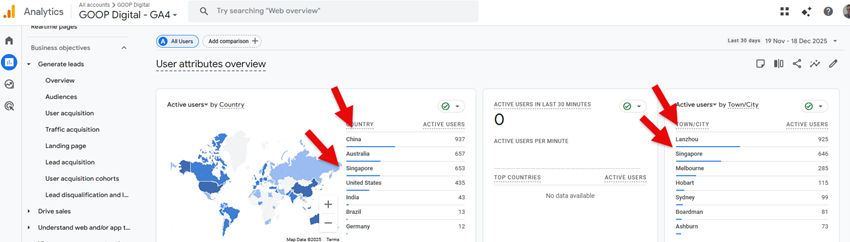
If your GA4 is affected, you will often see unexpected placements dominating the list. For many sites, Lanzhou and Singapore appear repeatedly and rank near the top.
Two quick extra checks that also help, even if you do not know GA4 well:
- Check for a mismatch between traffic and enquiries. If users and sessions jump while calls, form enquiries, bookings, and sales remain flat, that is a red flag.
- Check engagement. If engagement rate drops suddenly, average engagement time declines, or you see many sessions with no real action, it is another clue.
Why fake traffic in Google Analytics is a real problem for small businesses
For a regional business, your website is not there to win a popularity contest. It is there to bring in work.
- Your monthly report looks better, but business is not better. It can make you think your SEO or ads suddenly improved when they did not.
- Your conversion rate can look worse overnight. More sessions with no genuine buyers means your conversion rate drops even if your real leads stay the same.
- Location reporting becomes unreliable. If your Town or City report is filled with places outside your service area, it becomes harder to identify where your real customers are.
The worst part is the mental spiral. People start changing websites, ads, content, and budgets based on non-existent numbers.
Why is there no simple fix inside GA4 yet
Google knows about the issue. The problem is that GA4 is not set up like the old Universal Analytics, where you could filter and clean things in a simple, permanent way for every view.
The current recommended workaround is to use Segments inside Explore reports so you can view cleaner data without permanently deleting anything. That helps you analyse, but it does not automatically clean every standard report your business looks at.
Until Google rolls out improved protection, most businesses are stuck with manual workarounds to achieve clean reporting.
The practical workaround we use with Looker Studio
While we wait for Google to properly fix this at the source, you still need numbers you can trust for day-to-day decisions. This is where Looker Studio helps.
Instead of relying on the messy default GA4 screens, we build a simple reporting view that focuses on what matters to a small business owner, and filters out the obvious junk so you can read a clean story.
- A page that shows real-world results first, like calls, form submissions, bookings, quote requests, and the pages that drive them.
- A filter that excludes the most common bot pattern. For many regional Australian businesses, excluding traffic from China and Singapore is a safe starting point. If your business does get real enquiries from those places, this can be tuned.
- A comparison view that shows both all traffic and filtered traffic, so you keep the original data but make decisions from the clean view.
This is not a perfect fix. It does not eliminate bots. But it makes your helpful reporting again.
Keep your tracking clean so you can still trust the numbers
If GA4 is only being used as a visitor counter, any spike will cause panic. The way out is clean tracking that focuses on outcomes.
That is why we recommend proper GA4 setup and clean tracking, so your reports are built around actions that matter, not vanity numbers.
If you want help sorting out whether your GA4 is being polluted, and you want a Looker Studio view that shows the truth without the noise, we can help. Contact GOOP Digital.