
Most business owners know they have a Google Business Profile.
It is the listing that appears when someone searches for your business on Google or finds you on Google Maps. It can show your phone number, address, opening hours, reviews, photos, website and other important information.
But here is a better question:
Do you actually have access to it?
At GOOP Digital, we regularly encounter businesses for which the answer is unclear.
The profile may have been created years ago by an employee who has since left. An old agency may still control it. Someone in the business might have access, but nobody knows who the actual owner is.
That is worth fixing.
Your 15-minute check
Start by searching for your business name on Google while signed into the Google account you think is connected to your business.
If you have access, Google should give you options to manage your Business Profile.
To make this easier, have a look at the GOOP Digital example below.
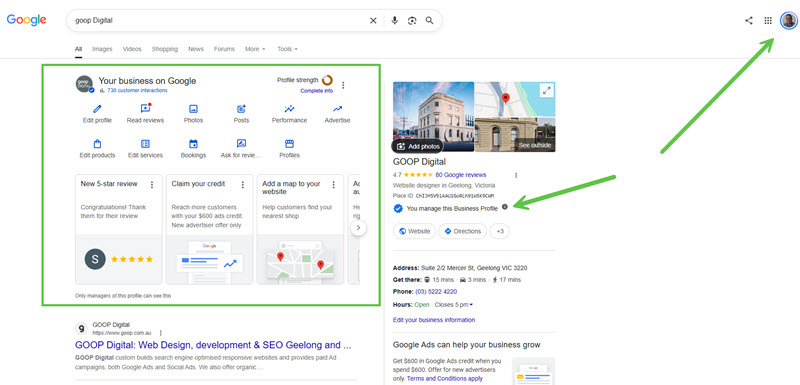
In the GOOP Digital example, there are two clear signs that we have access.
On the left, Google shows the Your business on Google management panel. This gives access to things such as editing the profile, reading reviews, adding photos and updating business information.
On the right, you can see the message You manage this Business Profile.
If you can see something similar when you search for your own business, that is a good sign.
If you cannot, there are usually two possibilities:
- You are signed into the wrong Google account
- You do not currently have access to the profile
GOOP Digital recommends that every business owner or senior decision-maker checks this personally.
Do not simply assume your bookkeeper, office manager, marketing company or web developer has it sorted.
We see too many cases where access sits with a former employee, an old supplier or a Gmail account nobody can get into anymore.
Check who has access
If you can manage the profile, the next step is to check who else has access.
Go into your Google Business Profile settings and look for People and access.
You should be able to see the people who currently have access to the profile and what level of access they have.
Take a proper look at the names.
Do you recognise everyone?
Does every person listed still work with your business?
Are there old staff members there?
Is a previous marketing agency still listed?
This is the part many businesses never check.
Who should own your Google Business Profile?
GOOP Digital recommends that the business itself retains primary control of the profile.
That does not mean your agency, marketing provider or web company cannot have access.
They often should.
But there is a difference between allowing someone to manage your profile and allowing them to control it.
Your business should always have access through an account that the business controls.
A senior person in the business should also know which account is being used and be able to get into it.
Think of it like your domain name or your website hosting.
You might pay someone else to manage it, but the business should still know where it is and who controls it.
What if an old employee still has access?
If a former employee still appears in your Google Business Profile access list, remove them.
There is no reason for someone who no longer works with your business to retain access.
The same applies to contractors, previous marketing companies and anyone else who no longer needs to manage the profile.
This is basic digital housekeeping, but it is often overlooked.
At GOOP Digital, we recommend reviewing access whenever someone leaves the business or when you change agencies or marketing providers.
Do not wait until there is a problem.
What if an old agency controls it?
This happens more often than it should.
A previous marketing company may have created the profile on behalf of the business years ago and still have ownership or primary control.
Start by contacting them and asking for ownership or the appropriate level of access to be transferred back to the business.
A reputable agency should have no issue with this.
The agency can still retain access if they are continuing to manage the profile for you, but the business should not be locked out of its own listing.
If the relationship with the old agency has ended, remove their access once everything has been transferred properly.
What if you have no access at all?
If you search for the business and cannot see any management options, start by checking your Google accounts.
Many business owners have several Google accounts and are simply signed into the wrong one.
Try any business-related Google accounts you know of.
If you still cannot access the profile, you may need to request access through Google.
The most important thing is not to panic and create a new listing simply because you cannot access the existing one.
That can create a second problem.
Don’t create another profile just because you cannot get into the first one
If your business already has a Google Business Profile, creating another one is generally not the answer.
You can end up with duplicate listings, different phone numbers, different opening hours or customers leaving reviews on the wrong profile.
Work through the access problem first.
Find out who controls the existing listing and regain access to that one.
Why this matters
Your Google Business Profile is often one of the first things a potential customer sees when they search for your business.
They may use it to:
- Call you
- Visit your website
- Check your opening hours
- Get directions
- Read reviews
- Look at photos
- Decide whether they trust your business
If you do not have access, you cannot properly control or update that information.
That makes this a very simple check with a potentially big impact.
Do this today
Set aside 15 minutes and check:
- Can you manage your Google Business Profile?
- Which Google account is connected to it?
- Who is the primary owner?
- Who else has access?
- Are any former employees still listed?
- Are any old agencies or suppliers still listed?
- Does everyone with access still need it?
If everything looks right, great.
If it does not, fix it now rather than finding out when someone changes your phone number, your opening hours are wrong, your listing is suspended, or the person with the login has disappeared.
Your Google Business Profile is an important business asset.
Make sure your business actually controls it.
Need help with your Google Business Profile?
If you are not sure who controls your Google Business Profile, cannot get access, or simply want someone to check that it has been set up properly, talk to GOOP Digital.
We can help you work out who has access, what needs fixing and what you should do next.
Call GOOP Digital if you would like more information or help with your Google Business Profile.